Tempo, to two decimals
With the half- or double-time reading beside it (one click switches), and whether the song keeps steady time or drifts like a live band.
Free · Max for Live · Ableton Live 12
Click any audio clip and Chopsmith Reader tells you its tempo, where bar 1 is, its key and its chords, bar by bar as it plays. One click puts your set on the song's tempo or its Scale.
Mac · Ableton Live 12 with Max for Live · free, for your email
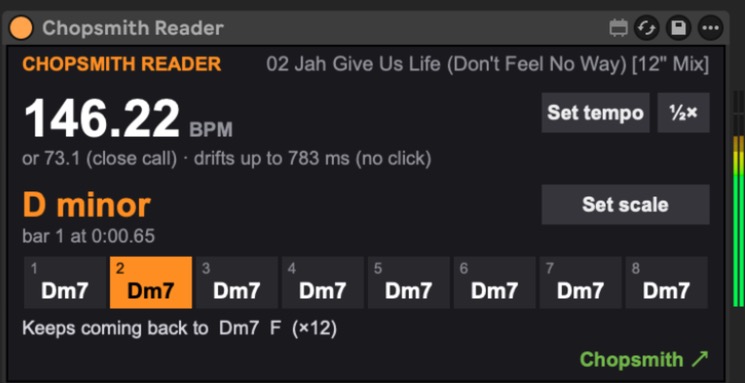
With the half- or double-time reading beside it (one click switches), and whether the song keeps steady time or drifts like a live band.
The first downbeat, in seconds. A short clip that's a loop is read as one: whole bars, starting on the 1.
Read from the notes, then settled by the chords, with the relative major or minor when it's a close call.
Eight bars at a time, following the playhead, with the current bar lit. Sevenths and sus chords when they're clearly there.
The four bars the song keeps coming back to, and how many times. Handy for writing parts that fit.
Put your set on the song's tempo, and Live's Scale on its key, so your MIDI clips, Push and Live's MIDI tools play in key.
Free. Leave your email and the download starts. You'll also hear about new versions and new devices, a few times a year, and every email has an unsubscribe link.
Thanks! Your download is starting. If it doesn't, download it here.
Unzip it and drag Chopsmith Reader.amxd onto any audio track in Live, then click a clip.
Version 1.0.0. Sent with Kit. See the privacy note.
The Reader's big brother uses the same reading to cut tempo-locked loops from any song or just its drums, bass or vocals, audition them in time, paste them into your set and turn them into MIDI.
A Mac (Apple silicon or Intel) and Ableton Live 12 with Max for Live: Live Suite, or Live Standard with the Max for Live add-on.
Yes, no key and no time limit. Your email is the price, and you can unsubscribe whenever you like and keep the device.
No. It only reads them. Set tempo and Set scale change the set's tempo and Scale, and Live's undo takes them back.
No. It reads your audio on your Mac and nothing leaves it.
Not yet. The Reader is Mac-only for now.